What the best AI agents do differently in 2025 (10 useful examples)

AI is everywhere. But results? Not so much:
- Employees spend 60% of their time on admin, not outcomes (source: McKinsey)
- AI is brought in to solve this, yet 77% of AI pilot projects never make it to production (source: IBM, OpenAI).
- Of the AI pilots that do launch, more than half fail due to quality and trust issues (source: Microsoft, Creole).
Why the gap?
Most companies fall into 4 camps:
- Not using AI — held back by concerns about data security, compliance, or simply not knowing where to start. Others lack policies, so employees either avoid AI tools like ChatGPT or use them quietly, without support.
- Using AI assistants — Using assistants like ChatGPT or Gemini, but struggling with limitations. Prompting is inconsistent, long chats lose context, and what seems efficient on the surface requires a lot of rework. A task done once must be redone the next time from scratch.
- Testing AI agents — Know how to build AI agents that (unlike AI assistants) can run workflows and act independently. But they’re frustrated by low-quality, unreliable output and lack of ROI.
- Deploying high-performance agents — Able to build, launch, and scale the best AI agents that deliver ROI by freeing up time, saving costs, and growing revenue.
If you’re trying to move towards Group 4, this guide is for you.

We’ll show you:
- What AI agents are and how they differ vs AI assistants and automations.
- What makes the best AI agents succeed where others fail.
- 10 examples of AI agents that save time, cut costs, or grow revenue.
- How to build an AI agent that works without wasting time or budget.
The best AI agents deliver results. They don’t just use AI, they act like employees — with goals, tools, collaboration, feedback, and iteration.
Let’s dive in.
What are AI agents?
AI assistants like ChatGPT and Claude are incredibly capable. They can understand context, analyse documents, remember key points, and even write code. But they’re still reactive — waiting for a prompt to do something.
AI agents build on that intelligence. They turn one or more AI assistants into autonomous systems that get actual work done – with goals, tools, memory, and feedback.
Unlike AI assistants, AI agents can be inspected and improved – prompt by prompt, task by task – until they deliver results your team can trust.

That’s the shift — From asking questions to automating actions. From using tools to orchestrating outcomes.
Done right, the best AI agents are able to:
- Trigger automatically (e.g. when a report is uploaded or a deal closes)
- Think through next steps
- Use tools, retrieve files, call assistants, and execute
- Test their own output, revise, and retry until quality is high

Because the problem isn’t a lack of AI. It’s a lack of systematic workflows to make AI usable, testable, and repeatable.
The building blocks of a modern AI agent
According to Google, IBM, AWS, and Andrew Ng, a modern AI agent includes:
- A Brain: An LLM (like GPT-4, Claude, Gemini) that does reasoning, language, or multimodal processing.
- Memory: Basic (short-term) or persistent (e.g. Redis, vector DBs) to track what’s happened so far.
- Tools: Access to APIs, apps, or plugins (e.g. email, CRM, spreadsheets, docs, dashboards).
- Planner: A logic layer that breaks a goal into steps and routes them to the right tools or sub-agents.
- Evaluator: Tests results, reruns failed steps, and applies feedback to improve output.
- Orchestrator: Manages multiple agents (e.g. a writer, a critic, and a fact-checker) working together.
The agent is the orchestrator — it coordinates LLMs, tools, and memory to run a repeatable workflow.
Example — A “warm deck” Sales AI agent

This Sales AI agent sends a personalised slide deck for every new CRM lead — automatically.
It uses an LLM (like GPT, Gemini, or Claude) as its “brain”, researches the lead via Google, and emails you a draft asking: “Ready to send or want to edit?”
Because it has memory, it learns from your feedback and gets better each time. Reps say it saves them hours per week — and the decks actually get opened.
Why it works?
- Better prompt → smarter AI agent: The system prompt tells the AI agent how to research, what must be in every slide, and the tone to use. A strong prompt is a game changer — refine it once, improve every run.
- Memory + feedback loop: The AI agent seeks human feedback and rep edits are saved to memory, so the agent avoids repeating mistakes.
- Tool orchestration: ChatGPT alone can’t run multiple Google searches or create slides. This agent can — because it uses real tools, not just words.
By combining tools, memory, and thoughtful prompting, the best AI agents are able to do what that ChatGPT or email tools alone can’t.
Agentic workflow ≠ Just automation
Andrew Ng describes four key design patterns behind agentic workflows:
- Planning: The agent breaks down a complex task into ordered steps
- Tool Use: It selects the right tool (e.g. OpenPose, Zapier, Google Sheets) for each step
- Multi-agent Collaboration: Multiple agents interact (e.g. writer + reviewer + approver)
- Iterative Execution: The agent tests and refines its own output across steps
“It’s like hiring a team – each agent plays a role, passes work back and forth, and delivers a result.” – Andrew Ng, BUILD 2024
You don’t need all of this on day one. Many working agents are simple. But as complexity grows, this structure enables consistency at scale.
AI agent vs AI assistant vs basic automation
| Feature | Automation (e.g. Zapier) | AI Assistant (e.g. ChatGPT) | AI Agent |
|---|---|---|---|
| Triggered by events | ✅ | ❌ | ✅ |
| Reasoning (LLM brain) | ❌ | ✅ | ✅ |
| Tool use | ✅ (fixed steps) | ✅ (with plugins) | ✅ (dynamic) |
| Memory across steps | ❌ | 🔸 Session-based | ✅ |
| Feedback & retries | ❌ | ❌ | ✅ |
| Multi-agent coordination | ❌ | ❌ | ✅ |
| Goal-based execution | ❌ | ❌ | ✅ |
| Advanced learning ability | ❌ | ❌ | ✅ |
Not all AI agents are equal
Calling something an agent doesn’t make it one.
- A Zap that calls ChatGPT once? Not an agent.
- A chatbot embedded in your app? Not an agent.
- A system that thinks, executes, retries, and improves? Now we’re talking.
With the best AI agents we’ve built & deployed, what made the difference wasn’t the LLM – it was whether the agent had a repeatable way to learn and improve.
How do the best AI agents deliver faster ROI?
Most AI pilots fail.
- 77% never make it to production
- Over 50% of those that do are shut down due to low quality or trust
- And in the few that work, ROI is rarely measured
The problem? Teams build what’s cool, not what pays off.
So – what actually drives AI agent ROI?
The best AI agents perform the right type of task
From Microsoft’s ROI framework and Invisible’s AI strategy playbook, high-ROI AI agents share 3 traits:
- Repetitive, structured tasks – e.g. weekly reports, email summaries, CRM updates. Less variance → easier to automate reliably
- Expensive to do manually – High-value time saved = strong ROI
- Has a testable outcome – You can measure quality and improve it
Vague or creative tasks are riskier. Still possible – but only with a human in the loop and feedback loops built in.
Examples of AI agents that delivered results
Based on cases from Microsoft, Section AI, and Creole Studios:
| Agent Use Case | What It Did | Measurable Result |
|---|---|---|
| Weekly reporting agent | Pulled GA4 data → wrote insights → built slides | Saved 8–12 hrs/mo per PM |
| Inbox triage agent | Flagged urgent emails → drafted replies | 40% faster response time |
| Sales research agent | Compiled LinkedIn + Crunchbase into summaries | Cut SDR prep time by 60% |
| Workflow QA agent | Reviewed tone + length + accuracy | Caught 70% of errors pre-review |
Common thread? Each agent replaced a costly human bottleneck with a testable, repeatable system.
When agents don’t deliver results (and why)
From Forbes:
- One-off requests – Cost and time of setup > benefit
- No quality criteria – No clear “pass/fail” → inconsistent outputs, hard to trust
- No API access – Manual tools block agent autonomy
- No feedback loop – Without AI and/or human feedback, errors pile up and system never improves
- Weak prompts – AI success comes from prompts, vague prompts = poor output
Low-quality output that doesn’t meet criteria is the enemy of ROI. So make sure to define quality (use a scorecard!) and have a clear-eyed view of which metric(s) do you expect will change if the AI agent works as expected.
How to Measure ROI (Before You Build)
Don’t build first and justify later. Estimate ROI upfront.
Bella Liu’s LinkedIn article offers a simple formula:
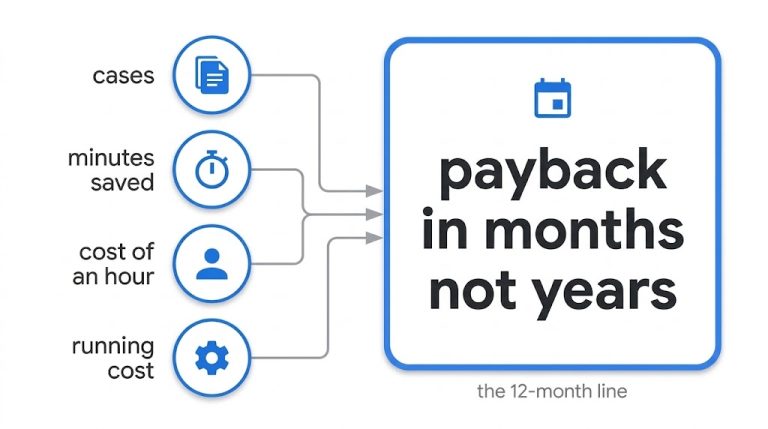
ROI = (Time saved x Value per hour) – Cost to build & maintain
A more expanded framework is shown in the below table.
| Metric | Example |
|---|---|
| Time saved | Hours saved per week per week |
| Cost reduction | Fewer hours billed or tools used |
| Accuracy rate | % of outputs needing no edits |
| Speed to delivery | Faster reports, replies, campaigns |
| Revenue impact | More demos booked, faster onboarding, higher LTV |
Track these from day one. Otherwise, your “pilot” becomes a black hole.
ROI Comparison Table
Not all agents are created equal. Choose repeatable workflows with measurable quality.
| Use case | Outcome | ROI |
|---|---|---|
| Creative copywriter “agent” | Inconsistent tone, high edit rate | 🔴 Low |
| CRM auto-updater | 100+ hours saved/month | 🟢 High |
| Workflow QA agent | 70% error catch rate | 🟢 High |
| Chat widget “agent” | Just a chatbot with no memory | 🔴 Low |
10 examples of actually useful AI agents (that save time, cut costs, or grow revenue)
Most AI demos look cool but don’t solve real business problems.
The best AI agents do things differently. These 10 agent use cases perform repetitive time-consuming tasks, freeing up your valuable people for more strategic work. They replace outsourced tasks, reduce costs by a lot, or directly increase revenue.
Each one is grounded in real workflows teams already do today – but better.
1. Lead Enrichment & CRM Qualifier
Who it helps: SDRs, SalesOps
Problem: Manual lead qualification is slow and inconsistent. SDRs spend hours Googling, copying LinkedIn bios, and tagging leads manually.
Current alternatives: Zapier-based enrichment (rigid). Manual lookup (slow). CRM scoring rules (basic).
Agent flow:
- Trigger: New form submission
- Tools: Clearbit API, LinkedIn scraping, CRM API (HubSpot, Salesforce)
- Actions: Enrich lead profile, validate intent signals, auto-score, assign rep
Why it works: Saves 10+ hours/week per SDR and improves speed-to-lead.
Result: Higher lead conversion, lower CAC.
2. Support Ticket Triage & Draft Reply
Who it helps: Customer Support Teams
Problem: First response times are slow. Tickets get misrouted. Drafting replies takes time.
Current alternatives: Rules-based routing, macros, offshore agents.
Agent flow:
- Trigger: New support ticket
- Tools: Helpdesk (Zendesk, Freshdesk), LLM (for draft), Triage database
- Actions: Auto-categorize, set priority, draft reply for agent approval
Why it works: Drafts replies for 60–80% of tickets. Cuts first response time by 50%.
Result: Faster CSAT wins, reduced team burnout.
3. Review booster from CRM notes
Who it helps: Customer Success, Marketing
Problem: Most happy customers never leave reviews. Teams forget to ask.
Current alternatives: Monthly campaigns, manual NPS follow-up, external agencies ($2k–5k/mo)
Agent flow:
- Trigger: Positive call notes, CSAT > 8, closed-won deal
- Tools: CRM (HubSpot, Pipedrive), Email/SMS API (Twilio, Mailchimp)
- Actions: Detect sentiment, draft personalised review ask, send follow-up
Why it works: Catches the moment of delight and automates the ask.
Result: 2-4x more 5-star reviews without needing an agency.
4. Slide deck generator from docs
Who it helps: Execs, Product, Consultants
Problem: Great reports stay buried. Turning them into slides takes hours.
Current alternatives: Interns. Consultants. Manual PowerPoint grind.
Agent flow:
- Trigger: New doc/report in Google Drive or Notion
- Tools: Google Slides API, Drive, LLM
- Actions: Parse structure, extract key points, build deck layout, design slides, save draft
Why it works: Translates dense reports into clean, readable decks automatically.
Result: Save hours. Share insights faster. Get buy-in quicker.
5. Content repurposing agent
Who it helps: Marketing Teams, Creators
Problem: Teams underuse their best content. Repurposing is manual and inconsistent.
Current alternatives: VA help, Notion checklists, agencies
Agent flow:
- Trigger: New blog or video
- Tools: LLM, Google Docs, Buffer or LinkedIn API, social image tools
- Actions: Extract ideas, write tweet thread, LinkedIn post, short email, script
Why it works: Makes one blog work 4x harder. Platform-fit from day one.
Result: Higher reach per asset. More traffic. Less content fatigue.
6. High-quality blog post writer
Who it helps: Content Marketers, Founders, SEO Teams
Problem: High-quality content takes research, outlining, writing, editing—a whole team.
Current alternatives: Freelancers. Content agencies. Internal bottlenecks.
Agent flow:
- Trigger: New brief or keyword
- Tools: Google Search API, Google Docs, LLM, CMS API
- Agents:
- Researcher: Finds top-ranking and customer-aligned info
- Writer: Creates outline + draft
- Reader: Reviews and gives feedback
- Editor: Applies edits
- Human: Final sign-off
- Editor: Publishes
Why it works: Keeps control in-house. Quality improves with feedback loops.
Result: 10x output with 2x better quality than freelancers.
7. High-quality slide deck generator
Who it helps: Strategy, Consulting, Product Teams
Problem: Draft decks are rushed. Quality varies. Senior people waste hours editing.
Current alternatives: Designers, senior staff, external firms
Agent flow:
- Trigger: New idea, meeting notes, or goal
- Tools: LLM, Google Slides API, Reader agent, Editor agent
- Agents:
- Writer: Drafts deck from input
- Reader: Scores for clarity, structure, persuasion
- Editor: Refines
- Notifier: Sends to Slack or email for review
Why it works: You get a A-level deck instantly. A+ polish after review.
Result: Save 5-8 hours per presentation. Increase win rates.
8. Deal spotter agent
Who it helps: Sales, RevOps
Problem: Reps miss key timing windows. Leads go cold.
Current alternatives: Sales alerts. Newsletters. Manual LinkedIn stalking.
Agent flow:
- Trigger: Prospect job change, funding news, site update
- Tools: LinkedIn scraping, Clearbit, CRM, email/Salesloft
- Actions: Match event to lead, draft outreach, wait for rep approval, send
Why it works: Flags deals reps would miss. Sends better-timed emails.
Result: Higher close rates. Shorter sales cycles.
9. Email revenue agent
Who it helps: eComm Marketing, Retention Teams
Problem: 1-time buyers rarely return. Retargeting is generic.
Current alternatives: Klaviyo flows. Manual segmentation. Abandoned cart emails.
Agent flow:
- Trigger: New 1-time buyer
- Tools: Shopify, GA4, Email tool (Klaviyo, Mailchimp), LLM
- Actions: Analyze past behavior, personalise product suggestions, draft & send email
Why it works: Tailored follow-ups = higher repeat buys. You own the experience.
Result: Better LTV. Lower churn.
10. Customer scoring & routing agent
Who it helps: Marketing Ops, CS, RevOps
Problem: Lead scoring is rule-based, outdated, or misaligned.
Current alternatives: Manual tiering. Fixed HubSpot scores. Consultant-led scoring models.
Agent flow:
- Trigger: New interaction or data signal
- Tools: CRM, Support platform, Web analytics, LinkedIn scraper
- Actions: Aggregate behavior + firmographics, score, tag, trigger next steps
Why it works: Signals evolve over time. Agent adjusts dynamically.
Result: Higher-quality routing. Better ABM targeting.
[Visual: “High-ROI Agent Use Cases by Function”
- Scene: Grid of 10 icons grouped by Marketing, Sales, Ops, Support, Product
- Caption: “Which one saves your team the most time or money?”
]
How to build AI agents that deliver results
You now know what AI agents are and where they pay off. Let’s dive into how to build one that actually works – without wasting time or budget.

1. Pick a high-ROI use case
Choose a task that is:
- Repetitive and structured
- Costly or slow when done manually
- Easy to measure (time saved, quality uplift)
Examples: Sales follow-ups, CRM updates, email triage, report generation, deck creation – anything that’s currently slow, repeatable, and costly.
Don’t build agents for edge cases or brand-new work – find the high‑value routine first.
[Visual: “Is This a Good Agent Use Case?” checklist. Columns: Example Task | Repetitive? | High-effort? | Clear output? | Agent Potential? ✔ or ✖. Include 3-4 tasks like “Build pitch deck,” “Summarise call,” “Design campaign.”]
2. Define your goal
Define your goal, not the task. Here are some examples:
Bad: “build content agent”
Good: “Increase blog output by 2x while keeping quality above X.”
Bad: “Create a chatbot”
Good: “Reduce weekly report prep from 5 hrs to 1 hr per PM”
It’s not about the model you use. It’s about the job you’re trying to get done.
[Visual: “Is This a Good Agent Use Case?” checklist. Columns: Example Task | Repetitive? | High-effort? | Clear output? | Agent Potential? ✔ or ✖. Include 3-4 tasks like “Build pitch deck,” “Summarise call,” “Design campaign.”]
3. Choose the right platform
Choose your starting stack based on speed, privacy, and flexibility.
- No-code: n8n, Botpress autopilot nodes – great for quick prototyping.
- Code + frameworks: LangChain, Anthropic’s MCP, or direct LLM + APIs—offers flexibility and control. reddit.com
- Hybrid: Start on no-code, then transfer to code once mature.
Start with something simple before investing heavily. We recommend the Hybrid approach i.e. start with a no-code tool like n8n or Botpress to quickly build & test your AI agent, and later switch to code.
For example, need speed and privacy? Use n8n on AWS with Claude, or Google Cloud with Gemini. Avoid direct LLM APIs if data needs to stay in-region.
4. Map out the workflow steps
Keep it narrow – one agent, one user group, one goal.
First, map out the agent workflow. n8n, Anthropic, Botpress, OpenAI, and Salesforce all say the most effective agents follow a “planner + executor + evaluator loops” structure:
- Trigger – What starts it? (e.g. new doc, form, support ticket)
- Planner – Breaks the goal into actionable steps (e.g. research → draft → review)
- Executor – Calls tools (LLMs, APIs, CRMs, Sheet plugins)
- Evaluator – Checks output quality and loops if necessary
- Orchestrator – Routes subtasks to multiple agents (e.g., writer + editor)
Don’t build the whole system – just the part you care about. That mini-step is where you prove value faster.
5. Wire up the brain, memory, tools, and feedback loop
Once you’re ready, wire up Memory, Tools, and Feedback:
- Start with short-term memory, then switch to persistent (e.g., Redis/vector DB) if needed.
- Connect tools via webhooks/APIs: CRM (HubSpot/Salesforce), Docs/Drive, Email/Slack/SMS, Analytics/Databases, Spreadsheets, etc.
- Add a feedback loop to evaluate output (e.g., readability, brand tone, quality score)
Teams that built quality feedback loops first are far more likely to report ROI.
6. Test, launch, measure, and iterate
Testing is not optional – it’s where ROI is made:
Anthropic recommends measuring and iterating until you’re able to see results:
- Run 20–30 trials
- Use “Reader” or “Critic” agents to flag weak output
- Capture user feedback
- Track metrics: time saved, error rates, engagement
- Tweak prompts, add steps, or adjust tool mapping
- Adjust and rerun – repeat until reliable
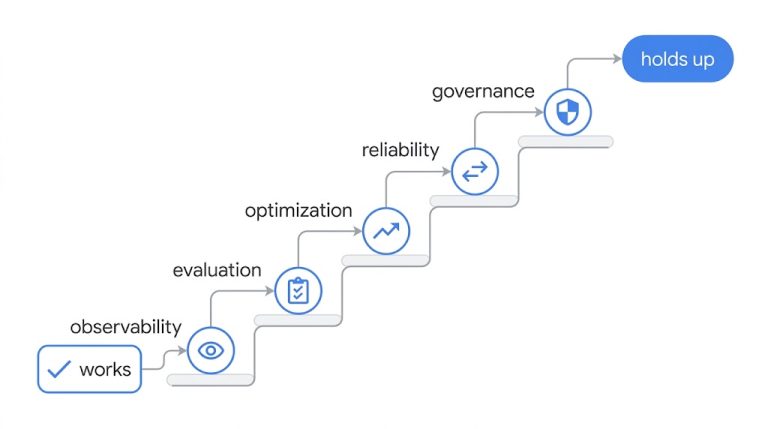
No evaluation = no improvement. An AI agent needs KPIs and a dashboard, not just code coverage. If you wouldn’t deploy a junior hire without oversight, why would you deploy an AI agent without metrics?
Define and track:
- Number of actions taken
- Error rate / retries
- Human overrides and item escalations
- Time saved per task
- Business impact (e.g. reviews generated, leads enriched, customer calls reduced)
Track performance weekly – iterate where ROI is weakest, double down where ROI is strongest.
Good agents don’t get it right the first time, they get it right over time.
7. Scale with confidence
Once you see ROI, scale with confidence:
- Extend to more users
- Automate similar workflows
- Share results internally (“Saved X hrs per week, Y% faster, Z% revenue uplift”)
Stories sell. Show the hours saved, errors reduced, or new revenue unlocked – your internal buy-in will follow.
If you need the AI to handle a lot of users or sessions, now is the time to transfer the AI agent to code on your selected cloud platform (like AWS Bedrock, Google Vertex, Microsoft Azure).
Pitfalls to avoid
Most failed agents didn’t fail due to bad models. They failed due to bad framing, bad scoping, or no feedback loop.
1. Building too wide, too early
Trying to automate the whole process from day one leads to bloat and low-quality output.
Fix: Start with one clear outcome, one team, one workflow.
2. No clear owner or success metric
Without a responsible owner or metric, agents drift.
Fix: Assign an owner and track 1-2 core KPIs (e.g. hours saved, content throughput, accuracy).
3. Over-trusting LLM output
LLMs are confident, not always correct. Unchecked output = brand risk.
Fix: Add evaluator agents, human approvals, and testing loops. Don’t skip QA.
4. Using “chatbot” thinking
Not every agent needs a chat UI. Many of the best agents work silently in the background.
Fix: Think outcome, not interface.
5. Ignoring feedback
Your agents will fail quietly unless feedback is part of the loop.
Fix: Capture feedback, retries, and quality scores – then act on them weekly.
6. Building tools instead of solving problems
A cool agent isn’t always a useful one.
Fix: Always start with a high-impact problem. Solve that, then scale.
Checklist – Is your AI agent worth building?
| Question | Yes? |
|---|---|
| Does this task repeat weekly or daily? | ✅ |
| Is it currently done by a human? | ✅ |
| Does it have a clear output (file, message, action)? | ✅ |
| Is it tied to a measurable goal (time saved, revenue, quality)? | ✅ |
| Do you already have access to the needed data/tools? | ✅ |
| Can you test it with 1 person/team first? | ✅ |
| Do you have a feedback loop and success metric? | ✅ |
If you answered yes to 5 or more, you’re ready to start.
FAQ
Find clear answers to common questions below. Have another question? Click here to reach out, we’ll respond quickly.
Need help building a high-performance AI agent?
We’re an experienced AI agent development company. Our AI agents perform because our process works:
- Strategy session to clarify goals
- Laser focus on improving your target KPI
- Dashboard to track real results (before vs after)
- AI training so you can use & modify the agent
- Ongoing support when you need it