How to calculate AI ROI: a 10-minute payback test for one process
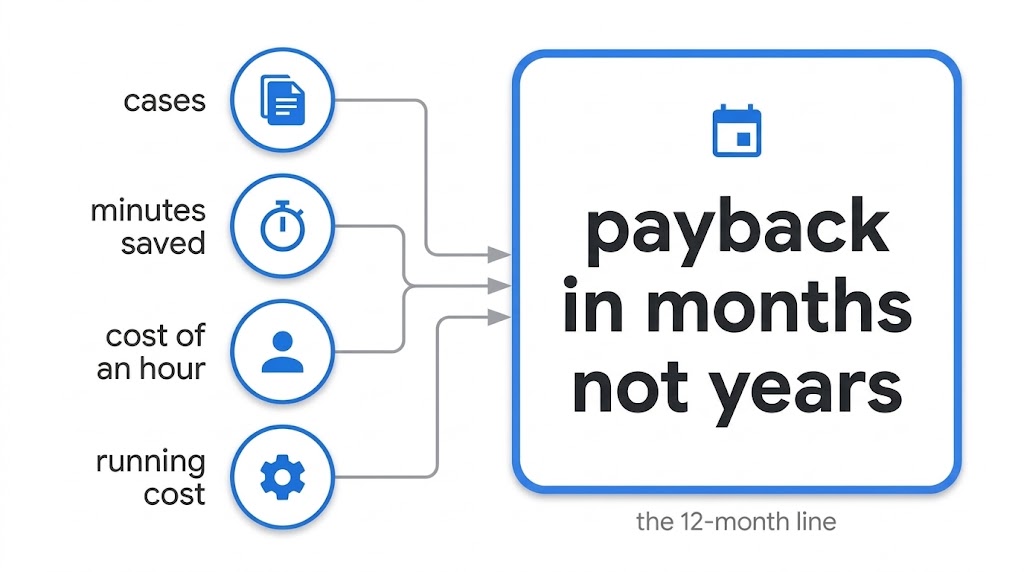
Someone has pitched you an AI workflow for one process: invoice checks, support tickets, quotes. By AI workflow I mean a business process where AI does part of the work and your people check the results. The pitch says it saves hours. Before you spend anything, check it with four numbers: cases a month, minutes saved per case, what an hour costs you, and what the AI workflow costs to run. You’ll have two already. A stopwatch and the vendor give you the other two.
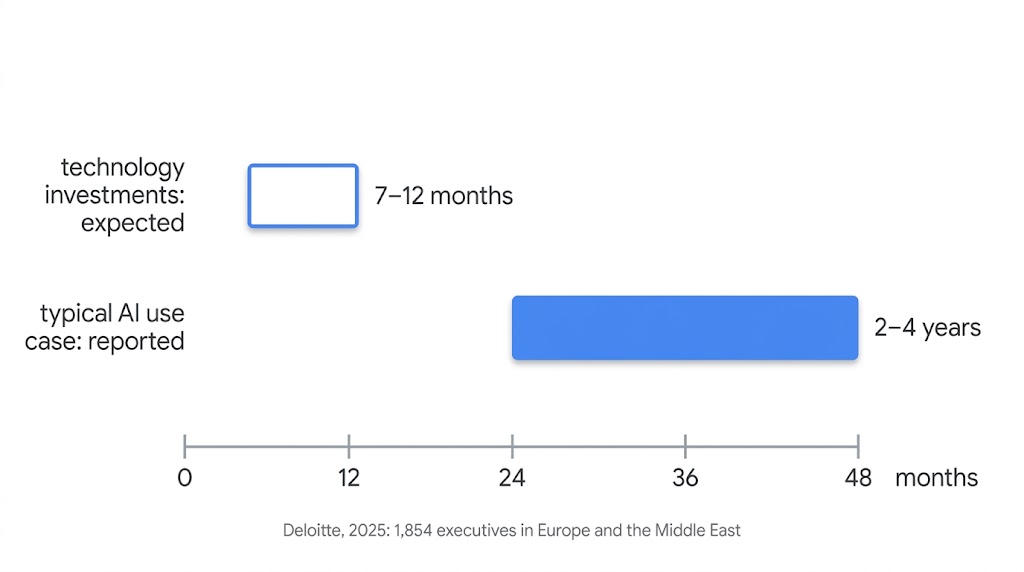
Most organisations say a typical AI use case takes two to four years to pay back, against the seven to 12 months expected of technology investments. That’s from Deloitte’s survey of 1,854 executives in Europe and the Middle East [1]. Only 6% report payback in under a year. You don’t have to guess which side your process lands on.
I’ll walk through the test on one process, matching invoices to purchase orders, then run it on four more processes, two of which fail, and look at a sixth that passes the maths but doesn’t need AI. All six are illustrative: realistic numbers, not client data.
The short version
- Hours freed a year = cases a month × minutes saved × 12 ÷ 60.
- Value = hours freed × what an hour costs you. Count half of it.
- Net value a year = that half, minus the yearly running cost.
- Payback in months = what you’ll spend ÷ (net value ÷ 12). Twelve months is the outer edge of what organisations expect from a technology investment [1].
In the examples below, invoice matching pays back every €10,000 spent in about four months. A monthly report that saves 144 hours a year takes over four years. The difference is volume, not AI.
The example: matching invoices to purchase orders
Picture a German parts distributor with about 600 staff (an illustrative example, not a client) that handles around 2,000 supplier invoices a month. Most match their purchase order automatically. About 15% don’t: descriptions arrive in mixed languages, units differ from the order, shipments split across several invoices. A person reads both documents and decides, which takes about 38 minutes per invoice.
The company already has an AI workflow for this, live but barely used. The goal is to make it reliable and get the team to use it, cutting the manual time by 60%: 22.8 minutes per invoice, after checking. Each step below uses this example.
Step 1: what an hour costs you
An hour of work cost German employers €45 on average in 2025 [2]. That covers pay plus employer costs such as social contributions and training. Overheads like office space and software aren’t in it, so it’s a cautious figure.
Other averages from the same release:
- Netherlands: €47.90 an hour.
- EU average: €34.90 an hour.
- UK: there’s no current official figure, so use your own payroll figure. The method works the same in pounds: read every € as £.
Your own number beats any average. For the team that does the work: gross pay plus employer costs, divided by hours actually worked.
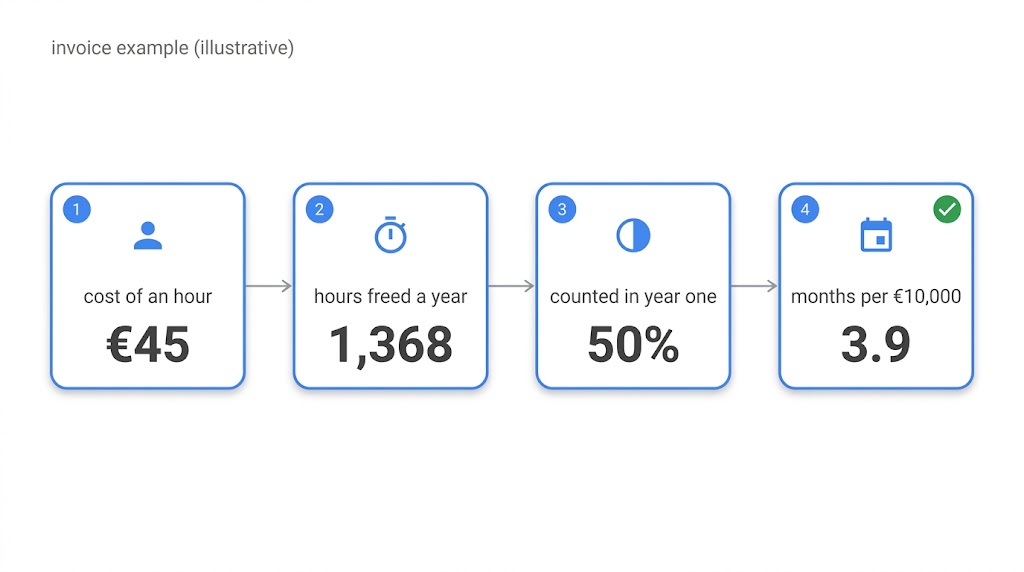
Invoice example: €45 an hour.
Step 2: hours freed
Hours freed a year = cases a month × minutes saved per case × 12 ÷ 60.
Invoice example: 300 invoices × 22.8 minutes × 12 ÷ 60 = 1,368 hours a year. At €45, that’s €61,560 a year before anything is taken off.
Three things keep this number honest:
- Count only the cases the AI workflow helps. That’s the 300 hard invoices, not all 2,000.
- Time ten real cases today. Use your stopwatch, not the vendor’s estimate.
- Subtract the checking time. If a person still reviews each case, minutes saved is the time before minus the review time after. The invoice example’s 22.8 minutes already allows for it.
Step 3: count half, then subtract the running cost
Freed hours turn into money only when someone decides what they’re for: overtime that stops, a hire you don’t make, an agency you drop, or work that has been waiting. In year one, some of the time simply disappears into the day.
People also take time to trust a new AI workflow. In the invoice example, as written, three of five processors still re-check its work by hand. So this test counts half the freed time until real numbers replace the estimate. That’s my assumption, not a law. If you can name where every freed hour goes, count more.
Then subtract the running cost: model usage, hosting, monitoring and licences. Don’t skip it. About one in five respondents to McKinsey’s 2026 survey say AI-related operating costs, including token costs, constrained their AI use [3].
Invoice example: €61,560 × 50% = €30,780 a year. Here the AI workflow is already live, and its €11,200 a year running cost is paid whether anyone uses it or not, so it adds nothing to this decision. For a new AI workflow, subtract the full yearly running cost.
Step 4: months to pay back every €10,000
Months to pay back every €10,000 = 10,000 ÷ (net value a year ÷ 12).
Invoice example: 10,000 ÷ (30,780 ÷ 12) = 3.9 months.
Then scale it to your own spend. Count everything you’ll pay before the AI workflow is in daily use: setup, build or licence onboarding, and your team’s time. Spend €20,000 making the invoice AI workflow reliable and getting the team to use it, and payback is 3.9 × 2 = 7.8 months.
The line is 12 months. Under it, the process is inside what organisations expect from any technology investment [1]. Over it, time saved alone doesn’t justify the spend.
Shortcut: net value a year is the most you can spend and still pay back within 12 months. For the invoice example, that’s €30,780.
Five processes through the same test
Same method for each: €45 an hour, half the freed time counted, running cost subtracted. The last column is also the test at a €10,000 spend.
| Process | Cases × minutes saved | Hours freed a year | Running cost a year | Net value a year | Months per €10,000 |
|---|---|---|---|---|---|
| Matching invoices to purchase orders (already live) | 300 a month × 22.8 | 1,368 | already paid | €30,780 | 3.9 |
| Sorting support tickets | 4,000 a month × 2.5 | 2,000 | €9,600 | €35,400 | 3.4 |
| Writing quotes from requests for quotation (RFQ emails) | 300 a month × 35 | 2,100 | €4,000 | €43,250 | 2.8 |
| Matching incoming payments to invoices (cash application) | 300 a month × 8 | 480 | €2,000 | €8,800 | 13.6: fails even at €10,000 |
| Monthly management-report commentary | 12 a year × 720 (12 hours) | 144 | €1,000 | €2,240 | 53.6: fails even at €10,000 |
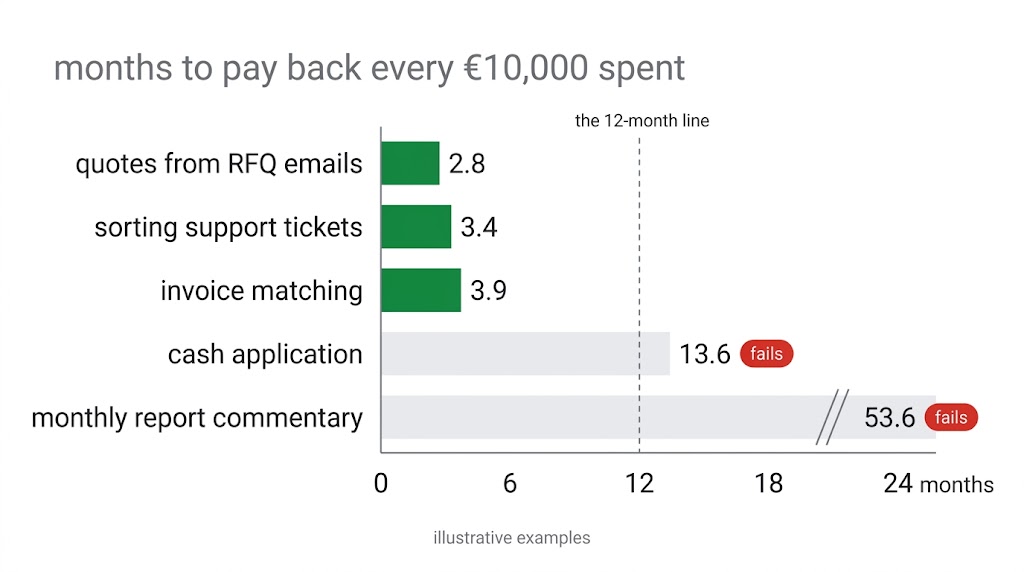
In these illustrative examples, the processes under about 1,000 freed hours a year failed, and the ones above it passed. That’s a pattern in five examples, not a rule: your hourly cost, running cost and spend move the line. Still, the amount of work matters more than how clever the AI is.
Three ways the answer is no
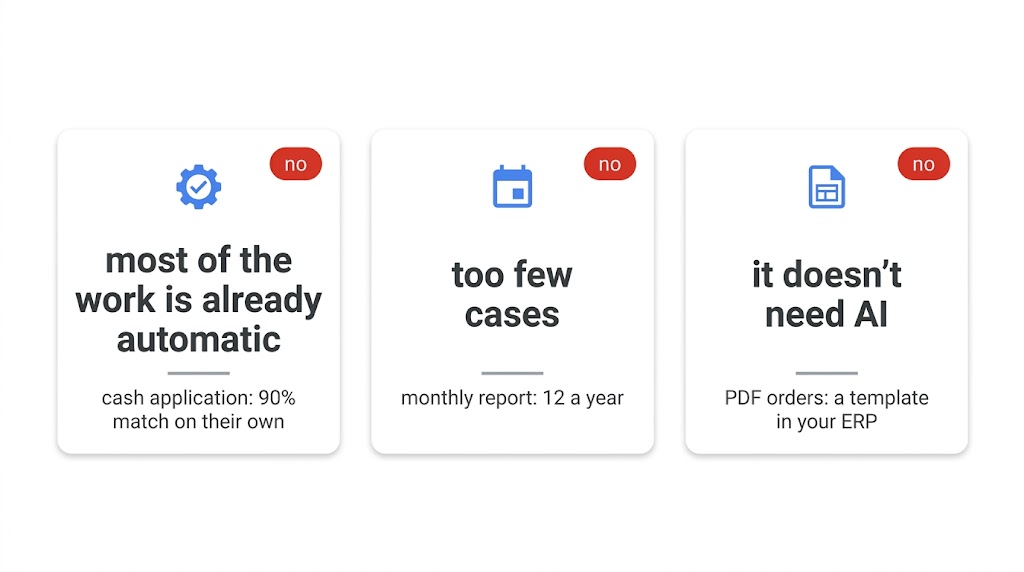
1. Most of the work is already automatic. Cash application handles 3,000 payments a month, but 90% already match on their own. The AI workflow only helps the 300 that don’t, saving 8 minutes each. That’s 480 hours a year and 13.6 months per €10,000. Faster cash collection might change the picture, but this test counts time only.
2. Too few cases. Writing the commentary for a monthly management report saves 12 hours each time, which sounds like a lot. But it happens 12 times a year: 144 hours. Every €10,000 takes 53.6 months to come back. A general AI assistant your team may already pay for is probably enough.
3. It doesn’t need AI. Purchase orders arrive as PDFs by email: 1,500 a month, 5 minutes each to type in. That’s 1,500 hours a year, €33,750 counted at half before running costs, and about 3.6 months per €10,000. It passes the maths. But a document-reading template or electronic ordering in the ERP (your finance and ordering system) you already run probably does the job without AI. That’s a no to AI, not a no to fixing the process.
A no on paper costs ten minutes. A no after the build costs the build.
Why Deloitte says years and this test says months
The three processes that pass here pay back every €10,000 in under four months. Deloitte’s respondents say a typical AI use case takes two to four years [1]. Both can be true:
- Deloitte reports what executives experienced; this test estimates in advance. Estimates run optimistic. That’s why this one counts only half the freed time and subtracts the running cost.
- Whole use cases, not one process. Deloitte asked about a typical AI use case, as each respondent understood it. That can include platforms, data work and several teams, so the spend is bigger. This test covers one scoped process.
- Busy processes. The three that pass here each free over 1,300 hours a year. A process with a few hundred hours a year, like cash application here, fails at the same spend.
The test also leaves out value it can’t see from four numbers: fewer errors, faster turnaround, lower risk. If those matter to you, they’re on top.
If your answer comes out much faster than Deloitte’s, check your inputs before you celebrate. And treat it as an estimate until real numbers replace it: case volume and minutes measured before go-live, and hours actually freed measured after.
Your worksheet
Fill in the last column. The invoice example is there for comparison.
| Line | What | How | Invoice example | Yours |
|---|---|---|---|---|
| A | Cases a month the AI workflow helps | Count last month | 300 | |
| B | Minutes saved per case | Time ten cases today; subtract checking time | 22.8 | |
| C | Hours freed a year | A × B × 12 ÷ 60 | 1,368 | |
| D | What an hour costs you | Your payroll figure, or €45 for Germany | €45 | |
| E | Value a year | C × D | €61,560 | |
| F | Counted (half) | E × 0.5 | €30,780 | |
| G | Running cost a year | Model usage, hosting, monitoring, licences | already paid (€11,200 a year) | |
| H | Net value a year | F − G | €30,780 | |
| I | Months per €10,000 | 10,000 ÷ (H ÷ 12) | 3.9 | |
| J | What you’ll spend | Setup and rollout, before daily use | €20,000 | |
| K | Payback in months | I × J ÷ 10,000 | 7.8 | |
| L | Most you can spend for a 12-month payback | = H | €30,780 |
Reading it:
- K at 12 or under: worth a closer look.
- K over 12: time saved alone won’t carry it. Stop, or find value the test doesn’t count.
- B is a guess: measure it before you decide anything.
Where to start
If you’re weighing several processes, or the worksheet left you unsure, the AI value review runs this test on each one with your real numbers, in one to two weeks for a single process, from €2,900. You get a keep, fix or stop call for each one, and for each process worth fixing or starting, the estimated payback and the assumptions behind it.
If one process clearly passes, start with week one of the AI delivery sprint. A sprint is a fixed-length, time-boxed piece of work with a measured result, as in agile. Week one costs €2,900 and replaces your estimates with today’s numbers: case volume, minutes per case and running cost. If week one shows the work isn’t worth doing, you can stop there and pay nothing more. If it’s a go, the sprint ends with a results report 30 days after go-live, against the numbers measured in week one. Go-live is 4 to 7 weeks after you sign.
Know exactly which workflow needs work? Go straight to the delivery sprint. Weighing a few, or not sure where to start? The review picks it for you.